Lesson · Grade 6 · Applied Design, Skills and Technologies
Copyright and Giving Credit
- Grade 6
- Applied Design, Skills and Technologies
- 1 min 3 s
- British Columbia
- BC6-AD-14
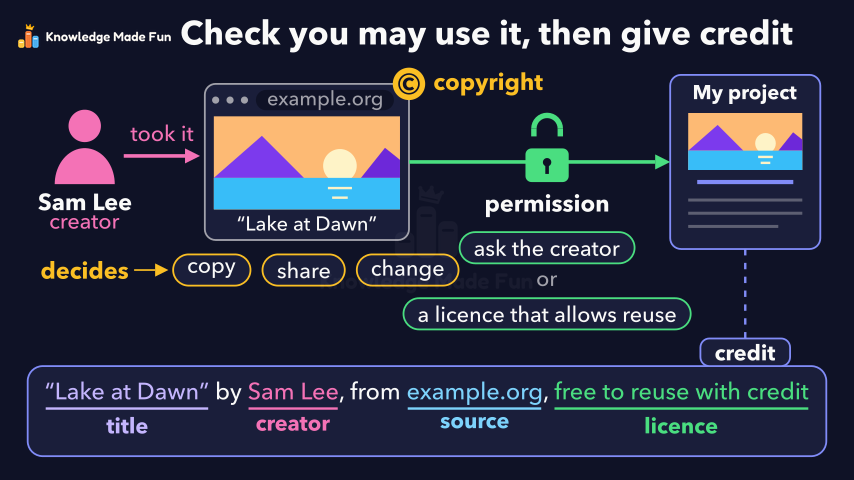
A creator's photo on a web page gets a copyright badge, which lets the creator decide who may copy, share or change it, and a lock on the way to the student's project opens only with permission: asking the creator or a licence that allows reuse. A credit line is then built with its four labelled parts (title, creator, source and licence), and the video ends on the recap "Check you may use it, then give credit".
Concept: Copyright and giving credit for other people's work
Anyone can watch two lessons on the website without an account. Signing in is free, no payment and no card, and opens three a day; Plus has no limit.
Loading
In one sentence
The question this lesson answers
Can you use a photo you found online in your own project?
A person named Sam Lee took this photo, so Sam is its creator.
Transcript
What the lesson says
Can you use a photo you found online in your own project?
A person named Sam Lee took this photo, so Sam is its creator.
The creator usually owns the copyright to their work.
Copyright means the creator decides who may copy, share or change the work.
Finding it online does not make it free to use.
One common way to get permission is to ask the creator.
Another is to pick work whose licence already allows reuse.
With permission, you may use the photo in your project.
Then always give credit, so everyone knows who made it.
Name the title of the work and its creator.
Add the source, which is where you found it, and the licence.
Remember, giving credit does not take the place of permission.
Before you use someone's work, check that you may, and always give credit.
Curriculum
Where this fits
- British Columbia, Grade 6
Applied Design, Skills and Technologies, Digital literacy: legal and ethical considerations, including creative credit and copyright, and cyberbullyingBC6-AD-14
Previous: Your Digital Footprint: What You Post Can LastNext: How a Search Engine Finds and Ranks Results
- British Columbia, Grade 7
Applied Design, Skills and Technologies, Digital literacy: legal and ethical considerations, including creative credit and copyright, and cyberbullyingBC7-AD-13
Previous: Your Digital Footprint: What You Post Can LastNext: How a Search Engine Finds and Ranks Results
This lesson is also listed in Grade 7.
The outcomes and strands follow the British Columbia curriculum.
Keep going
 1 min 11 s
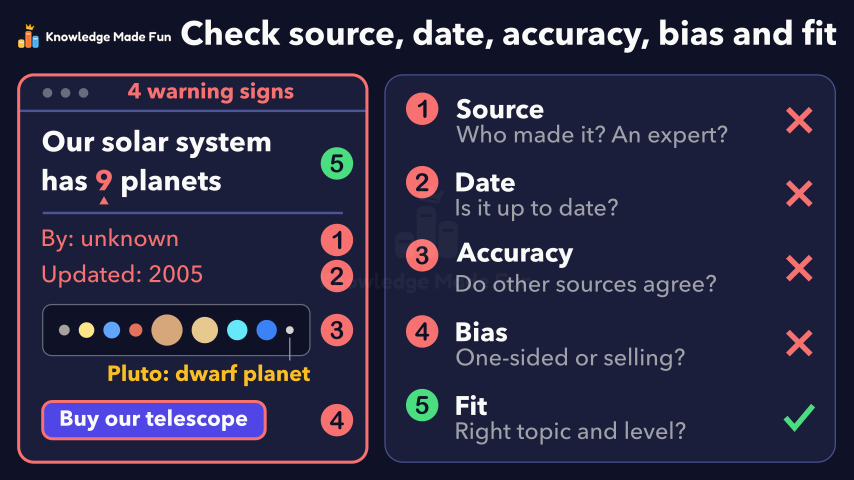
Can You Trust This Website? Five Checks
Grade 6 · 1 min 11 s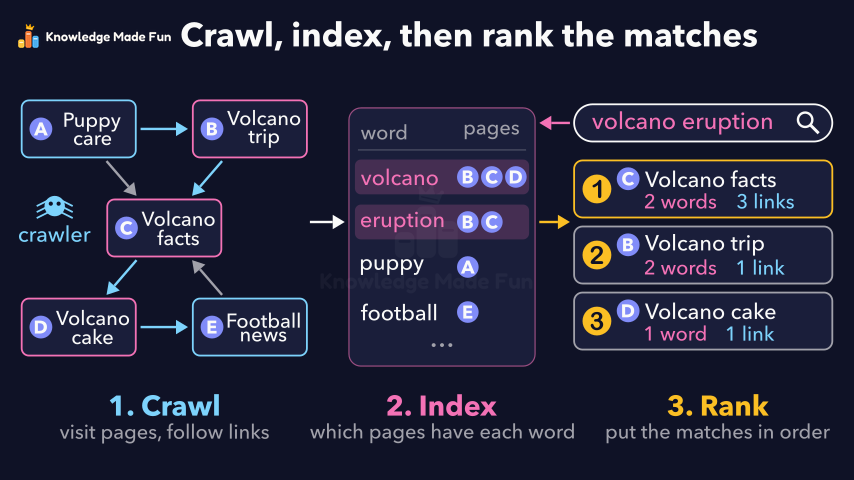 1 min 14 s
How a Search Engine Finds and Ranks Results
Grade 6 · 1 min 14 s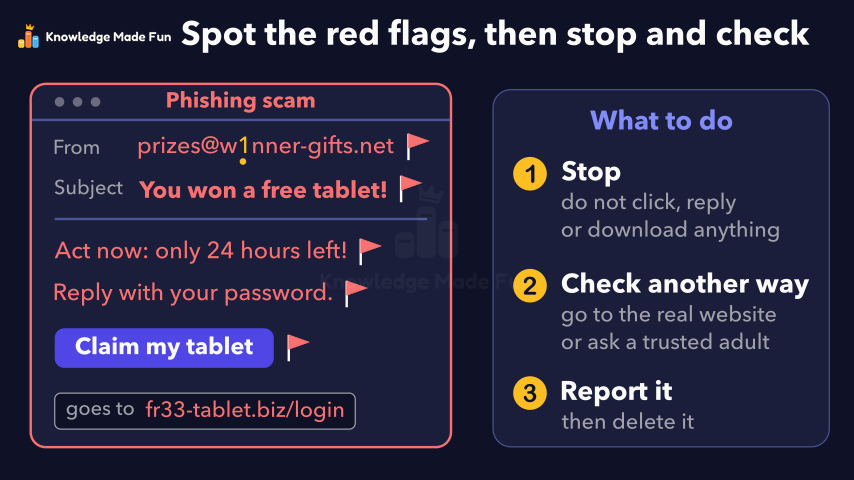 1 min 13 s
Spotting Online Scams and Phishing
Grade 6 · 1 min 13 s 1 min 14 s
Strong Passwords and Passphrases
Grade 6 · 1 min 14 s 1 min 2 s
Your Digital Footprint: What You Post Can Last
Grade 6 · 1 min 2 s 1 min 19 s
Algorithms: Steps in Order, Choices and Loops
Grade 6 · 1 min 19 s 1 min 7 s
Camera Shots: How Close-Ups and Wide Shots Tell a Story
Grade 6 · 1 min 7 s 1 min 10 s
Energy Is Never Used Up
Grade 6 · 1 min 10 s
- All Grade 6 Applied Design, Skills and Technologies lessons
- Create a free account to watch three lessons a day, no payment and no card.