Lesson · Grade 6 · Applied Design, Skills and Technologies
Troubleshooting: Fix It Step by Step
- Grade 6
- Applied Design, Skills and Technologies
- 1 min 9 s
- British Columbia
- BC6-AD-08
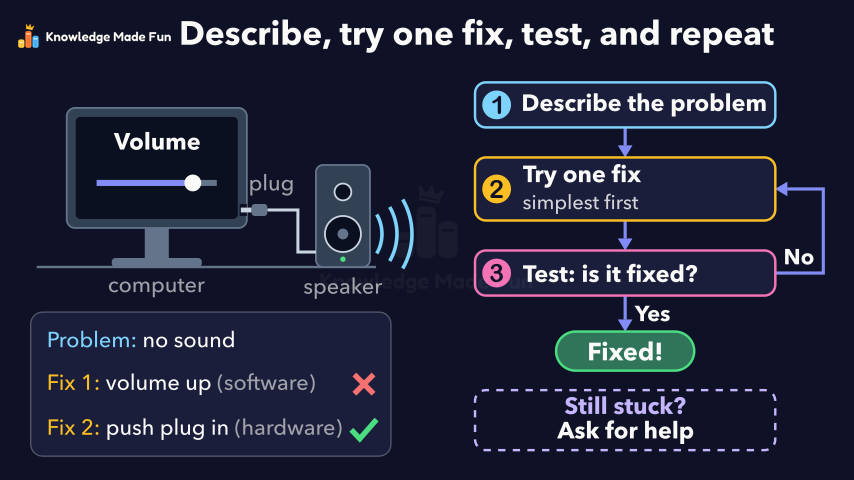
A computer's speaker makes no sound, and a chart builds up the steps one at a time: describe the problem, try one fix (simplest first), then test whether it is fixed, going back for the next fix if it is not. The computer acts out each step: turning up the volume (a software setting) doesn't help, pushing in a loose plug (hardware) does, a notes card records each try with a cross or a tick, and the video ends with "Still stuck? Ask for help" and the recap "Describe, try one fix, test, and repeat".
Concept: Troubleshooting: finding and fixing a computer problem step by step
Anyone can watch two lessons on the website without an account. Signing in is free, no payment and no card, and opens three a day; Plus has no limit.
Loading
In one sentence
The question this lesson answers
This computer's speaker makes no sound, so how can we fix it?
Troubleshooting means finding and fixing a problem step by step.
Transcript
What the lesson says
This computer's speaker makes no sound, so how can we fix it?
Troubleshooting means finding and fixing a problem step by step.
First, describe exactly what is wrong: no sound comes from the speaker.
Next, try the simplest fix first: turn up the volume, which is a software setting.
Change only one thing at a time, so you know which fix worked.
Then test it: is the problem fixed now?
There is still no sound, so the answer is no.
When a fix does not work, go back and try the next one.
Next, we check the hardware and push the loose plug in firmly.
We test again, and now the sound works.
So the answer is yes, and the problem is fixed.
If none of your fixes work, ask for help and say what you tried.
To troubleshoot, describe the problem, try one fix, test it, and repeat until it is fixed.
Curriculum
Where this fits
- British Columbia, Grade 6
Applied Design, Skills and Technologies, Computers and communications devices: strategies for identifying and troubleshooting simple hardware and software problemsBC6-AD-08
Previous: How Devices Connect: Home Networks, Intranets and the InternetNext: Input and Output Devices: How Information Gets In and Out
- British Columbia, Grade 7
Applied Design, Skills and Technologies, Computers and communications devices: strategies for identifying and troubleshooting simple hardware and software problemsBC7-AD-07
Previous: How Devices Connect: Home Networks, Intranets and the InternetNext: Input and Output Devices: How Information Gets In and Out
This lesson is also listed in Grade 7.
The outcomes and strands follow the British Columbia curriculum.
Keep going
 1 min 18 s
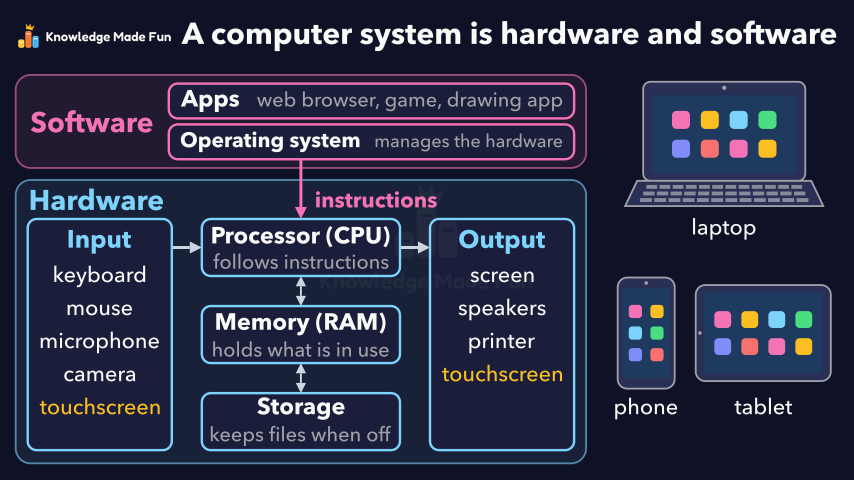
Hardware and Software: The Parts of a Computer System
Grade 6 · 1 min 18 s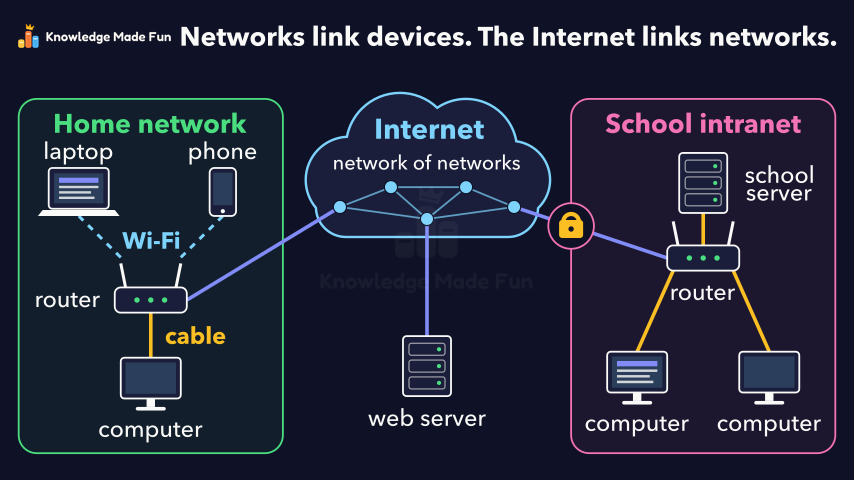 1 min 10 s
How Devices Connect: Home Networks, Intranets and the Internet
Grade 6 · 1 min 10 s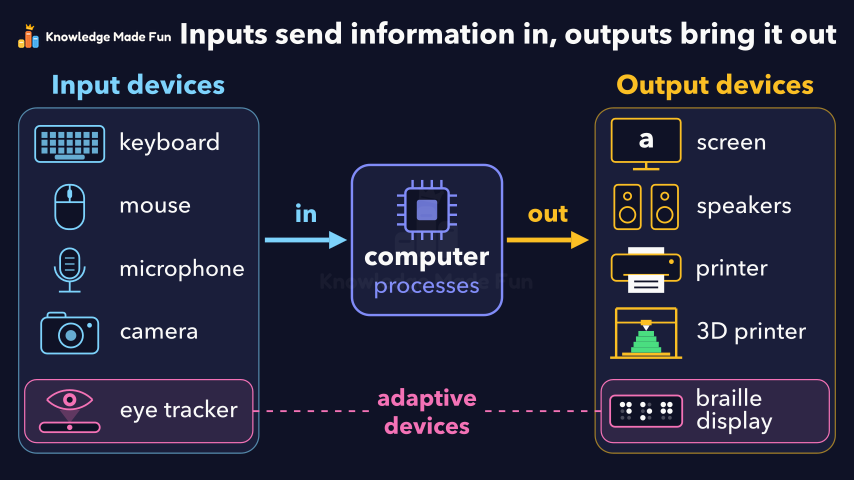 1 min 13 s
Input and Output Devices: How Information Gets In and Out
Grade 6 · 1 min 13 s 1 min 19 s
Algorithms: Steps in Order, Choices and Loops
Grade 6 · 1 min 19 s 1 min 7 s
Camera Shots: How Close-Ups and Wide Shots Tell a Story
Grade 6 · 1 min 7 s 1 min 11 s
Can You Trust This Website? Five Checks
Grade 6 · 1 min 11 s 1 min 3 s
Copyright and Giving Credit
Grade 6 · 1 min 3 s 1 min 10 s
Energy Is Never Used Up
Grade 6 · 1 min 10 s
- All Grade 6 Applied Design, Skills and Technologies lessons
- Create a free account to watch three lessons a day, no payment and no card.